


How to Install IPTV Smarters App on Your Firestick or Android Device in 2024
In the ever-evolving world of streaming, IPTV (Internet Protocol Television) has become a popular way for users to access a vast array of channels and content. One of the most user-friendly IPTV applications available today is IPTV Smarters. If you’re looking to enhance your streaming experience on your Firestick or Android device, this guide will walk you through the installation process in 2024.
What is IPTV Smarters?
IPTV Smarters is an intuitive application that allows users to stream live television channels, including movies and series. The app is designed to support various IPTV services, providing a customizable viewing experience. Its ease of use and comprehensive features make it a popular choice among IPTV enthusiasts.
Why Choose IPTV Smarters?
- User-Friendly Interface: Easy navigation and organization of your favorite channels.
- Multiple Device Support: Compatible with a range of devices, including smart TVs, Android devices, and Firestick.
- Customization Options: Personalize your viewing experience with customizable playlists and EPGs (Electronic Program Guides).
- Multi-User Support: For families or groups sharing a subscription, IPTV Smarters allows multiple user accounts.
Prerequisites for Installation
Before proceeding with the installation, ensure you have the following:
- A Firestick or Android device.
- An active IPTV service subscription.
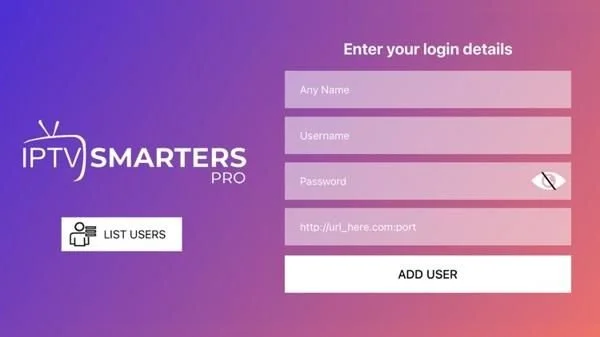
- Access to the app’s login credentials (username, password, and URL).
How to Install IPTV Smarters on Firestick
Follow these simple steps to install IPTV Smarters on your Firestick:
Step 1: Enable Apps from Unknown Sources
- Navigate to the Settings menu on your Firestick.
- Select My Fire TV (or Device).
- Click on Developer Options.
- Toggle Apps from Unknown Sources to ON.
Step 2: Install the Downloader App
- From the Firestick home screen, search for "Downloader" using the search function.
- Select the Downloader app from the search results.
- Click on Download and wait for the app to install.
Step 3: Download IPTV Smarters
- Open the Downloader app.
- In the URL field, enter the following link: https://iptvsmarters.com/ and click Go.
- The app’s APK file will start downloading. Once it finishes, click Install.
Step 4: Launch IPTV Smarters
- After installation, click on Open or return to the home screen and find the IPTV Smarters app.
- Launch the app and enter your IPTV service login details when prompted.
How to Install IPTV Smarters on Android Devices
Installing IPTV Smarters on an Android device is just as straightforward:
Step 1: Allow Installation from Unknown Sources
- Go to Settings on your Android device.
- Select Security & Privacy (or just Security).
- Enable the option for Unknown Sources.
Step 2: Download IPTV Smarters
- Open a web browser on your Android device.
- Go to IPTV Smarters Download Page.
- Choose the Android version and start the download of the APK file.
Step 3: Install the APK
- Once downloaded, locate the APK file (usually in the Downloads folder).
- Tap on the file and select Install.
- Follow the on-screen prompts to complete the installation.
Step 4: Configure the App
- Open the IPTV Smarters app.
- Enter your IPTV subscription details, including username, password, and URL.
- Enjoy streaming your favorite live channels and content!
Conclusion
In 2024, installing IPTV Smarters on your Firestick or Android device ensures that you have access to a huge library of content at your fingertips. By following the steps outlined above, you’ll be ready to enjoy the benefits of IPTV without any hassle. Stream responsibly, and enjoy your viewing experience!